










Instagram videos are valuable resources for digital storytelling, creative inspiration, and content production. From Reels and tutorials to brand campaigns and behind-the-scenes footage, creators can study different formats to improve their own work.
However, Instagram’s built-in Save feature only bookmarks content within the platform. Some public Reels offer native downloads, but availability depends on creator settings and platform restrictions.
Online downloaders, browser extensions, mobile applications, and other methods provide additional options. This guide explores seven practical approaches, highlighting their benefits, limitations, and suitability for content creators.
How We Chose the Best Instagram Video Download Tools
Different downloading methods suit different creative workflows. We considered several factors when comparing the available options:
- Supported formats: Reels, feed videos, Stories, and carousel posts.
- Video quality: Preservation of available HD resolution and audio quality.
- Ease of use: Straightforward downloading without complicated setup.
- Compatibility: Support for mobile devices and desktop computers.
- Privacy: Avoiding unnecessary Instagram credential requests and helping protect user privacy.
- Cost: Free access, subscriptions, and potential download limits.
- Reliability: Consistent access to supported public content.
A downloader cannot restore details already lost through Instagram compression, so the best tools stay close to the original upload when available. Likewise, downloading publicly accessible content does not automatically grant permission for commercial reuse, and services should only access content from public accounts to respect user privacy.
7 Best Ways to Download Instagram Videos for Content Creation
1. Grabfy: Featured Browser-Based Instagram Downloader
Grabfy is a practical choice for creators who want to save publicly accessible Instagram videos without installing additional software.
Its browser-based workflow supports different Instagram formats, making it useful for collecting storytelling references, studying editing techniques, and organizing authorized creative materials.
For an accessible Instagram video download solution, Grabfy allows users to submit supported public Instagram links and save available media directly to their devices.
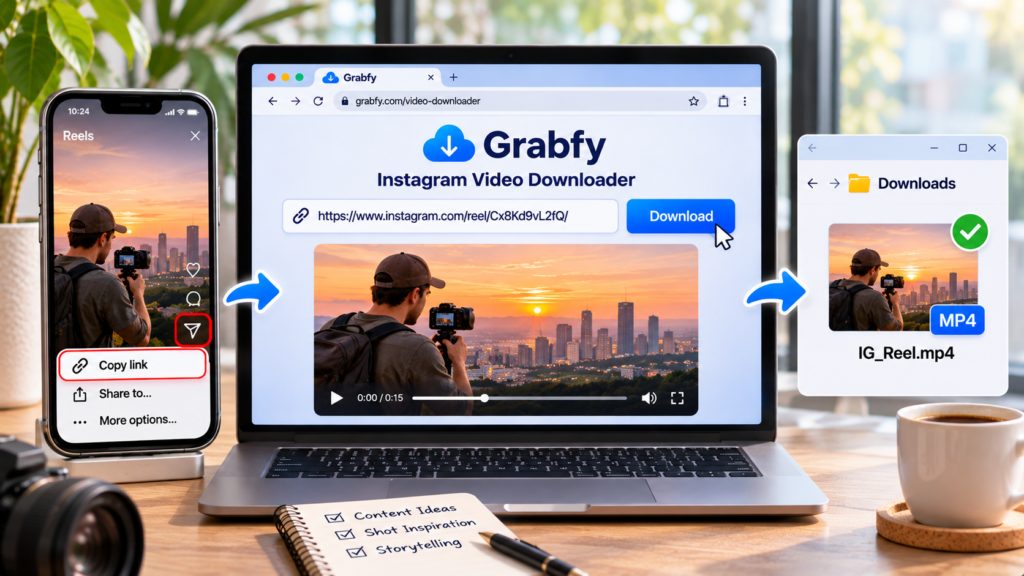
How to use Grabfy:
- Open Instagram and find the public video or Reel.
- Tap Share and select Copy link, or copy the URL from the browser’s address bar.
- Open the Grabfy Instagram Video Downloader in any modern browser, including a mobile browser.
- Simply paste the copied URL into the input field and click the download button.
- Use the generated download link to download videos and save them to your device, usually in a few seconds.
Grabfy supports publicly accessible Reels, feed videos, Stories, photos, and carousel posts where available.
Its main advantages are browser accessibility, a familiar link-based workflow, and no requirement to enter Instagram credentials into the downloader.
Limitations: Private posts and unavailable media cannot be retrieved. Strong tools can retrieve public files directly from Instagram’s servers rather than from a re-encoded screen recording, but quality still depends on the source upload. When available, Grabfy preserves HD and original quality, including audio quality and full audio quality, so Instagram downloaders save content in original quality without watermarks; no watermarks are added to downloaded Reels, and all downloaded videos are completely watermark-free. Downloads are processed securely without tracking, and files may save to your downloads folder depending on your device. Downloading content created by other users generally requires permission from the creator.
2. Browser-Based Multi-Site Video Downloaders
Multi-site downloaders support videos from several social media platforms rather than focusing exclusively on Instagram.
They typically require users to copy a video URL, paste it into a website, and select a download option.
These tools can be useful for creators researching content across multiple platforms.
However, Instagram-specific features may be limited. Story support, carousel downloading, advertising, and available resolutions can vary between services.
3. Instagram Video Downloader Browser Extensions
Browser extensions can simplify frequent desktop downloads by adding downloading controls to supported Instagram pages.
For content creators collecting numerous references, this may reduce repetitive copying and pasting.
Some extensions also offer options for saving carousel media.
However, extensions may request access to browsing activity or website content. Their functionality can also change when Instagram updates its interface.
Before installation, review permissions, publisher information, update history, and user feedback.
4. Dedicated Mobile Apps for Instagram Downloads
Mobile downloader applications are designed for people who frequently save Instagram content on smartphones.
Some integrate with the device’s Share menu, allowing users to send supported Instagram links directly to an application.
Additional features may include previews, basic editing, or file organization.
However, certain apps contain advertisements, require subscriptions, or request unnecessary permissions.
For occasional downloads, browser-based tools may provide a simpler alternative without additional installation.
5. Telegram Bots for Instagram Video Downloads
Telegram bots offer a chat-based downloading method.
Users send a supported public Instagram video link to a bot, which may return a downloadable file.
This approach can appeal to creators who already use Telegram for communication and media sharing.
However, bot availability, supported formats, and video quality can vary.
Sending links to a bot also shares that information with its operator, making privacy considerations important.
6. Screen Recording for Creative References
Screen recording provides an alternative when direct downloading is unavailable.
Modern smartphones and computers generally include built-in recording features.
This method can help creators document permitted demonstrations, interface interactions, or their own content.
However, recordings may capture interface elements, reduce visual quality, or require additional editing.
Audio recording can also be restricted depending on the device and application.
Screen recording should not be used to bypass access restrictions or content protections.
7. Cloud-Based Automation for Content Management
Cloud automation can support businesses and creative teams managing authorized media collections.
Platforms such as Zapier and Make help coordinate supported workflows, organize files, and automate notifications.
However, Instagram’s API restrictions limit which content can be retrieved programmatically.
Automation does not provide unrestricted access to public or private Instagram media.
This approach is generally more appropriate for teams managing their own assets than for occasional downloading.
Which Instagram Video Download Method Fits Your Needs?
The most suitable method depends on your workflow.
Grabfy is a strong starting point for creators who want browser-based access to supported public Instagram videos without installing applications.
Multi-site downloaders suit cross-platform research, while browser extensions and mobile apps may appeal to frequent users.
Telegram bots provide chat-based convenience, screen recording supports permitted capture tasks, and cloud automation helps teams organize authorized content workflows.

How to Choose the Right Instagram Video Downloader
Match the Tool to Your Content Format
Not every downloader supports every Instagram format.
Creators working with temporary Stories can use a specialized Instagram Story Saver while public content remains accessible.
VideoDropper, SSSInstagram, and Snapgram are also associated with Story downloading, although their supported features and availability may differ.
For creators collecting multiple Instagram formats, Grabfy provides a convenient central option for supported public videos, Reels, photos, and Stories.
Its browser-based approach is especially relevant when building visual reference collections for digital storytelling projects.
Prioritize Privacy and Security
Avoid services requesting Instagram passwords, verification codes, or unnecessary device permissions.
Check website addresses, review privacy policies, and be cautious of misleading download buttons.
HTTPS protects information during transmission but does not independently guarantee a service’s trustworthiness.
Can You Download Instagram Videos in HD?
Some Instagram videos are available in HD, but the downloaded quality depends on the source. Reputable tools protect privacy by accessing only public Instagram accounts, not content from private accounts or a private Instagram account.
Instagram may resize or compress uploaded media before making it accessible. The best tools pull public files directly from Instagram’s servers, which helps preserve original quality, original upload, and audio quality when those elements remain available in the source. Some services also offer quality options, though the final result still depends on what was uploaded and whether full audio quality is still present.
A downloader cannot create genuine 4K detail from a lower-resolution file or guarantee preservation of licensed audio. No-login tools also reduce exposure because they do not require an Instagram account sign-in or extra Instagram credentials, and some do not keep a visible download history.
For creative projects requiring professional-quality footage, obtaining the original file from its creator is preferable.
Is It Legal to Download Instagram Videos?
Downloading and reusing Instagram videos are separate considerations.
Copyright generally protects original videos, photographs, music, and other creative material.
Saving content for personal reference does not automatically grant permission to repost, distribute, or commercially exploit it.
For professional storytelling projects, obtain appropriate authorization before incorporating another creator’s footage into published work.
Tips for Organizing Downloaded Instagram Videos
A structured reference library helps creators locate useful material when planning future projects.
Organize files into folders such as Storytelling References, Editing Techniques, Campaign Inspiration, and Approved Assets.

Use descriptive filenames containing the creator, content topic, and date.
Keep original Instagram links and attribution information alongside saved media.
For authorized projects, back up important files and separate inspiration materials from content approved for publication.
Final Thoughts
Instagram video download tools can support digital storytelling, creative research, and content organization.
Browser-based downloaders offer accessible workflows, while extensions, applications, and automation tools address different production needs. A web-based tool is often the simplest fit for quick saves across phone, tablet, and desktop. For many users, there is no software installation needed, which keeps the process lightweight.
Choose a method that matches your content format, device, and workflow. Prioritize realistic quality expectations, account security, and respect for creators’ rights when building your digital storytelling library.